6 min read
How to Accept USDC Subscriptions: Step-by-Step Guide
How to accept USDC subscriptions step by step: add your wallet, create a monthly plan, share the checkout link and get paid on-chain every cycle.

To accept USDC subscriptions, you need a wallet to receive the money and a billing tool that can charge your customers' wallets every cycle. With TidePay, you add your wallet, create a recurring offer, and share a checkout link: each customer approves once, and every renewal lands in your wallet automatically.
This guide walks through the whole setup in about 15 minutes, with no code. If you're a developer, there's an API section at the end.
What you need
A wallet you control. Any EVM wallet (one 0x address works on Polygon, Arbitrum, Base and Optimism) and/or a Solana wallet. For business revenue, a hardware wallet is safest.
A TidePay account. Free to create; you pay 1% per successful charge, with no monthly fee.
A price and a billing cycle. For example, 20 USDC a month.
You don't need USDC yourself to start, and your customers don't need an account with anyone, only a wallet with USDC on a supported network.
How USDC subscriptions work
Most crypto payments are pushed: the customer sends money each time. A subscription has to be pulled, so the customer gives permission once and you charge on schedule. TidePay handles that permission on-chain:
The customer approves once. At checkout they connect their wallet and authorize the subscription. On EVM networks they also sign the terms: the maximum per charge, the minimum interval between charges and the fixed list of payees. TidePay's contract enforces those terms. On Solana, the same happens through the
@solana/subscriptionsprogram.TidePay charges each cycle. On every renewal date, the plan amount moves from the customer's wallet to yours in one transaction. TidePay never holds the funds.
You're notified. Signed webhooks tell your app about each payment, failure and cancellation.
The customer stays in control: they can cancel, or revoke the approval from their wallet at any time. And because the charge is on-chain, there are no chargebacks.
Step by step: accept USDC subscriptions with TidePay
Step 1. Create your account and merchant
Sign up at tidepay.cc and create your merchant, the workspace that holds your plans, subscriptions and API keys. Pick how you'll use TidePay (payment links and subscriptions, a checkout on your site, the API, or paid Telegram groups) and the dashboard shows only the steps you need.

[SCREENSHOT: onboarding — "How will you use Tidepay?" with use-case cards]
Step 2. Add the wallet that receives your money
On "Where should we send your money?", paste your EVM wallet (an address starting with 0x, used on Polygon, Arbitrum, Base and Optimism) and/or your Solana wallet. Each payment goes straight from the customer's wallet to this one, in the same transaction. You can change it later in Settings.
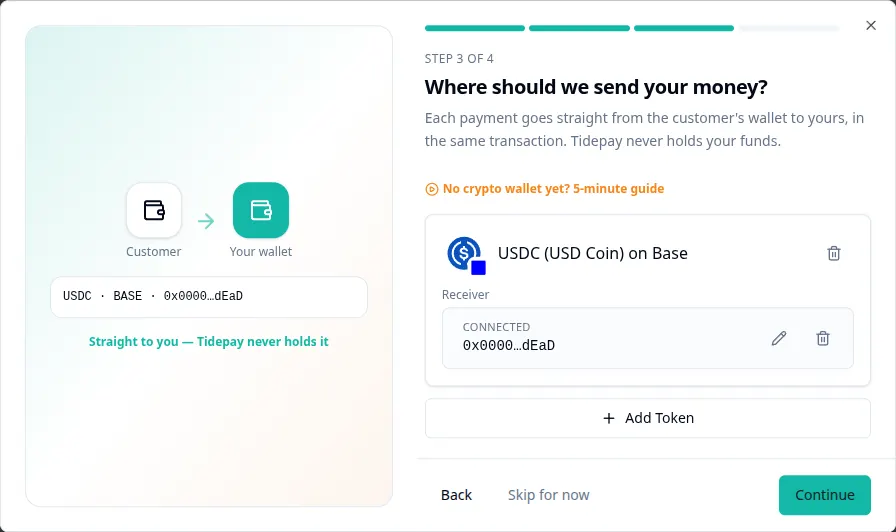
[SCREENSHOT: onboarding — receiving wallets, EVM and Solana fields]
Step 3. Create a recurring offer
Go to Products & Offers → Create and fill in:
Name and description, shown at checkout, for example "Pro Plan." Optional: a product image and a list of features.
Amount, for example 20.
Payment type: Recurring payment. Pick a cycle (weekly, monthly, quarterly, semi-annual, yearly, or a custom one).
First charge: when the customer subscribes, after a free trial, or on a fixed billing date (for example, the 1st of every month).
Number of charges: unlimited until canceled, or end after a fixed number.
Accepted chains and tokens: choose every network and token a subscriber can pay with, such as USDC on Base and Polygon.
Optional: split each charge across up to 9 destination wallets (the percentages must add up to 100%), and choose which customer details to collect, such as name and email.
The live preview on the right shows the hosted checkout as your customer will see it. Click Create payment link.

[SCREENSHOT: Create offer — recurring payment, monthly preset, USDC on Base selected, live preview]
Step 4. Share the checkout link
Open the offer's Paylink tab to copy the link, share it from your phone, or download a QR code. You can create more than one link per offer, for example for a campaign, with its own name, redemption limit and expiry date.
To keep customers on your own site, use the Embed tab instead: one script tag renders the checkout inline.
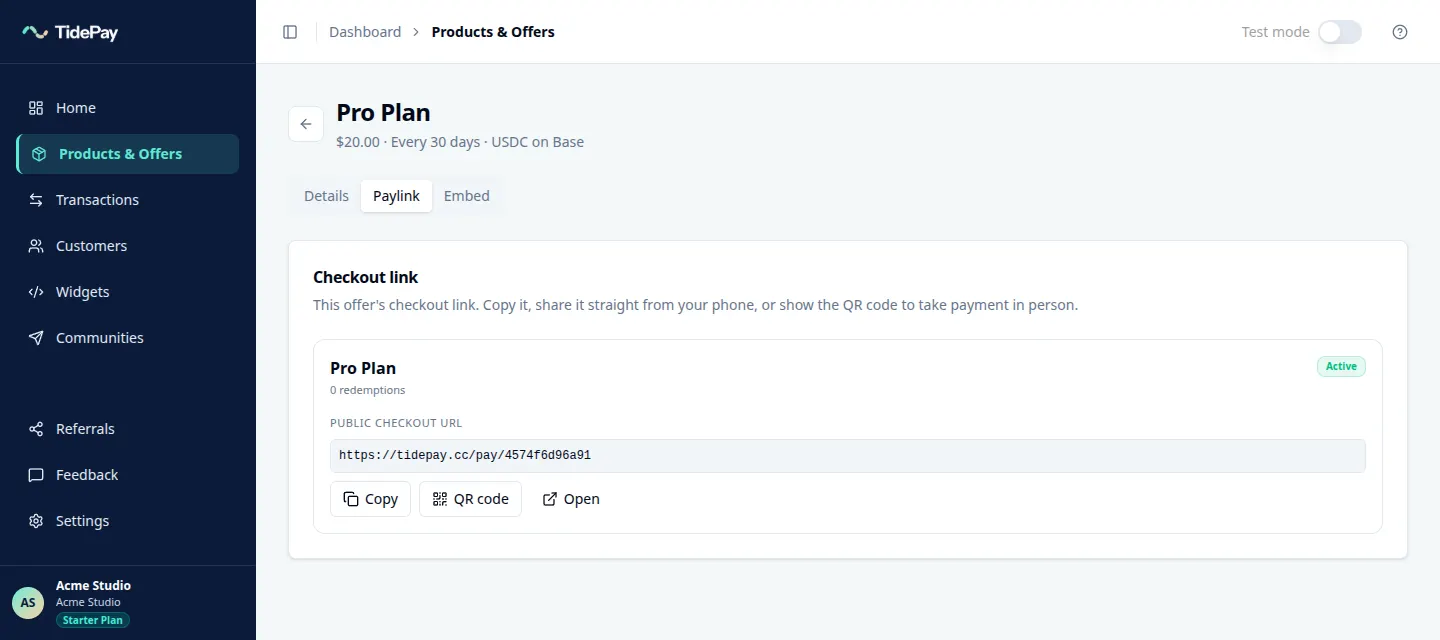
[SCREENSHOT: offer detail — Paylink tab with Copy, Share and QR code]
Step 5. Your customer subscribes
The customer opens the link, connects their wallet (MetaMask, a WalletConnect wallet or a Solana wallet), and approves the subscription once. Depending on your settings, they're charged right away, after the trial, or on your billing date.
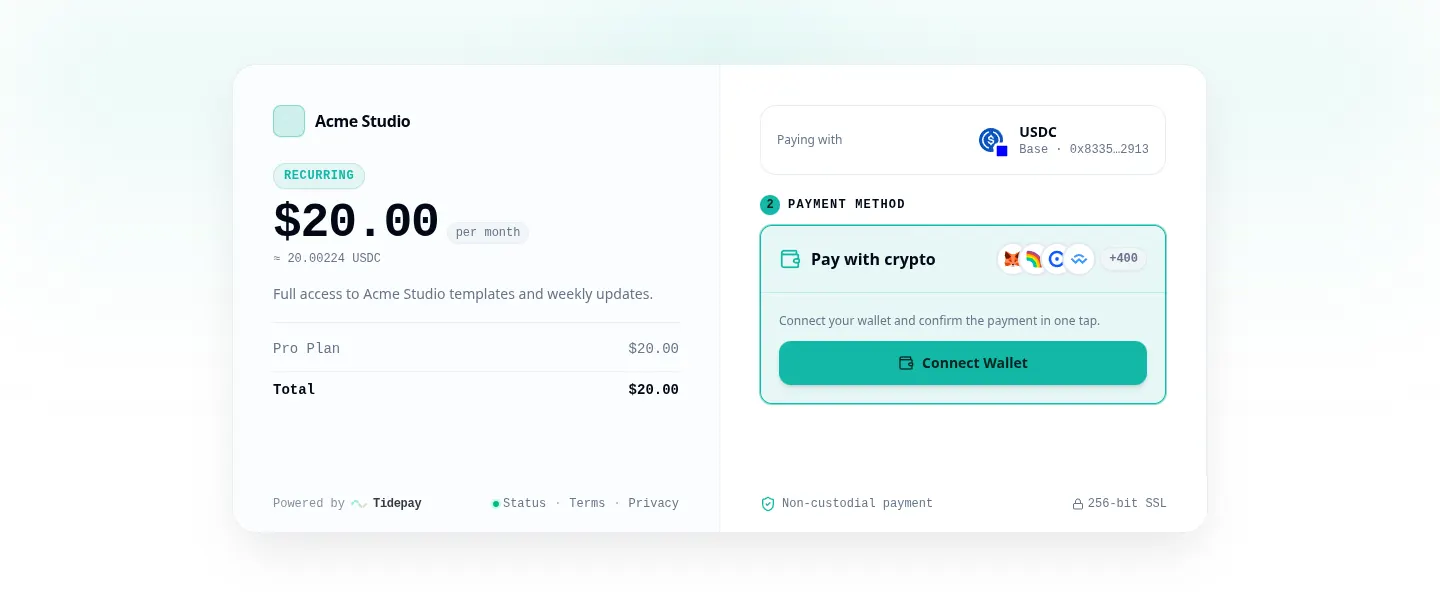
[SCREENSHOT: hosted checkout — "Pay with crypto", connect wallet, approve]
Step 6. Renewals run on their own
From then on, TidePay charges each cycle automatically, covers the network gas on these renewals, and sends the USDC to your wallet. Track everything under Transactions and Customers. If a charge fails because the wallet is short, the subscription goes past due and TidePay retries before canceling.

[SCREENSHOT: Transactions list with a successful renewal]
Test before going live
Switch the dashboard to test mode to try the whole flow: payments are simulated with test wallets, and no receiving wallet is needed.
For developers: the API and webhooks
Everything above can also be done through the REST API at https://api.tidepay.cc/v1, authenticated with an X-API-Key header. A typical flow: create an offer, create a customer, then create a subscription and send the customer to the subscribeUrl in the response.
curl https://api.tidepay.cc/v1/subscriptions \
  -H "X-API-Key: $TIDEPAY_TEST_KEY" \
  -H "Content-Type: application/json" \
  -d '{ "offerId": "offer_...", "customerId": "cust_...", "idempotencyKey": "signup-42" }'
Then register a webhook URL under Settings and handle events like payment.succeeded (extend access), payment.failed (warn the user) and subscription.canceled (end access). Each webhook is signed with HMAC-SHA256 so you can verify it came from TidePay. In test mode, you can fast-forward a subscription up to 12 billing cycles to test your handlers. The full reference is at docs.tidepay.cc.
Common problems and how to fix them
Problem | Why it happens | Fix |
|---|---|---|
The chain or token you want isn't offered when creating the offer | No receiving wallet is set for that network family | Add an EVM or Solana wallet in Settings, then create the offer again |
"Split recipients must sum to exactly 100%" | The split percentages don't add up | Adjust the destination wallets until the total shows 100% |
A split address is highlighted | The address doesn't match the chain (for example, a 0x address on Solana) | Use an address from the same network family |
The customer's renewal failed | Not enough USDC in the wallet, or the approval was revoked | The subscription goes past due and TidePay retries; ask the customer to top up or approve again |
You need to change the price | Billing terms are fixed after creation, because customers signed them | Create a new offer with the new price and move customers to it |
"Wallet transfer" isn't available for your plan | Subscriptions need an on-chain approval, which only wallet connect provides | Keep wallet connect on for recurring plans; manual transfer is for one-time payments |
FAQ
Can I accept USDC subscriptions without coding?
Yes. Add your wallet, create a recurring offer in the dashboard and share the checkout link. The API is optional.
Which networks can customers pay on?
USDC and USDT on Polygon, Arbitrum, Base, Optimism and Solana, and EURC on Base and Solana. You choose which ones each offer accepts.
Who pays the gas on renewals?
TidePay covers network gas on automatic subscription renewals. On one-time payments, the payer covers gas.
Can I offer a free trial?
Yes. Set the first charge to "After a free trial" and choose the number of days. The customer approves at checkout and is first charged when the trial ends.
What does it cost?
1% per successful charge, 0.8% above $25K a month, with no monthly fee and no setup cost.
Can customers cancel on their own?
Yes. They can cancel the subscription or revoke the approval from their wallet at any time, and TidePay can never charge more or more often than the terms they signed.
Start accepting USDC subscriptions
Create a free TidePay account and set up your first plan in a few minutes. Read more about recurring billing on TidePay.